Misfora Hospitality · Private beta

Automate hotel guest registration with passport & ID scanning

For hotels, apartments and property managers. Guests scan a passport or ID in the browser, and Misfora extracts and verifies the data. The guest record is ready in Misfora and your PMS for check-in, with government reporting available where supported.

Already have your own software? Use the Web Scanner SDK or the OCR API to build your own workflow.
misfora.com / guests / live
Arriving today — 14 guests 9 ready to check in
Ready-made for properties

Guest registration

Bookings come from your PMS or Google Sheet, guests scan a passport or ID in the browser, and you get structured guest data — with CSV export and government registration where supported.

See how it works →
Have your own PMS or app?

Web Scanner SDK & OCR API

The same capture and recognition engine, for your own software: add passport and ID scanning to your web app with the SDK, or send document images to the OCR API.

Web Scanner SDK → OCR API →
Government reporting is optional

Guest registration in different countries

Collect and verify guest documents before arrival, manage guest records in one place, and connect the workflow to your PMS or government system where supported. Government reporting is optional: where an integration is available, Misfora prepares and submits the required data; where it isn't, you still collect, verify, store and export structured guest records.

Government reporting

Where Misfora supports a government system, verified guest data is prepared and submitted automatically after check-in. Currently — Turkey (KBS).

Turkey KBS →

Guest records

Where there is no direct government integration, Misfora still collects documents, extracts and verifies guest data and stores structured guest records according to your property's retention settings and applicable local requirements, then deletes them automatically. Guest data can also be exported to CSV at any time and sent wherever you need.

How it fits together

From document to registration

Document OCR

Passport & ID recognition.

Also available as a standalone API →

PMS integrations

Connect guest data to your existing PMS — with custom integrations available for specific workflows.

Registration & export

CSV export in any country. Automatic government registration where an integration exists.

Turkey (KBS) today · other countries on request

Hospitality · A familiar picture

What guest registration usually looks like

Manual entry

Passport data is entered manually into the PMS — with a steady stream of arrivals, this is the first thing that eats up front-desk time.

Scattered channels

Document photos in WhatsApp, spreadsheets in Excel, phone calls — guest data lives in three places at once, none of them serving as the single source of truth.

Manual reporting

Submitting data to government systems is one more separate step — easy to forget or do late.

How does Misfora fit your workflow?

Connect the way you already work

I use a PMS

Connect Misfora to your PMS and automate guest check-in and registration.

Connect a PMS →

I use a spreadsheet

Connect your Google Sheet and keep managing bookings exactly as you do today.

Use Google Sheets →
A different question

Not “what’s stored in the system”, but “what’s happening right now”

Most PMS platforms answer the question “what bookings do we have”. Misfora answers a different one — “what stage is each guest in, and what needs to happen right now”.

Issues surface immediately, instead of getting lost in the general list of bookings.

How it works

From booking to check-in — without extra windows

01

The booking lands in the system automatically

As soon as a guest books a room, it appears in the dashboard right away. Cancellations or changes to guest count sync automatically too, with no manual updating.
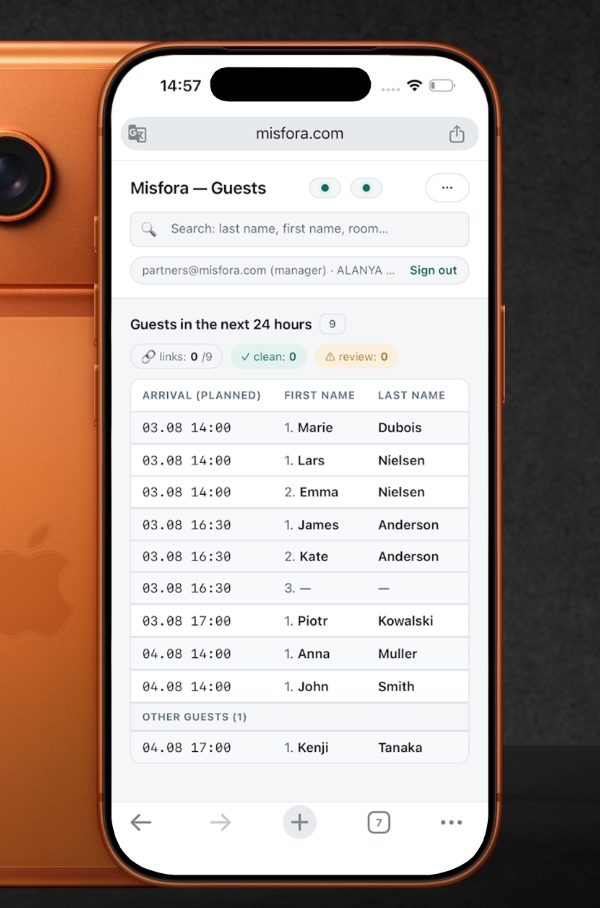
A new booking appearing in the Misfora guest table on a phone
02

The guest gets a link

Guests either fill in their details themselves ahead of arrival, or a staff member sets it up right at the front desk.

An email notification with the guest's personal check-in link
03

Takes a photo of their document with a phone

A passport from any country, or an ID card with a machine-readable zone. No separate equipment, app, or scanner — everything happens right in the browser.

04

Document data is extracted automatically

Straight into the guest record — and back into your PMS if you use one, so nothing is entered twice.

05

Export or government registration

Download structured guest data as CSV in any country. Where a government integration exists (currently Turkey, KBS), registration is submitted automatically the moment a guest checks in.

Structured guest record
Last nameGARCIA
First nameMARIA
NationalityARG
DocumentPassport · 00000000
Expiry2032-05-02
CSV export · government registration where required

Currently available: PMS — Exely, spreadsheets — Google Sheets, CSV export, government registration — KBS (Turkey), other countries on request. For companies in Ukraine without their own IT team, Misfora sets up the Diia integration. The same capture and recognition engine is also available for other software as the Web Scanner SDK and a standalone OCR API. The platform is designed so new PMS providers and countries can be added without rebuilding the product.

Exely Google Sheets KBS Diia REST API
How Misfora fits your setup

Use Misfora with the system you already have

Have a PMS? Connect it.
No PMS? Use your Google Sheet.

We don’t replace your PMS — Misfora works on top, handling guest registration and check-in, and feeds the data straight back. Bookings, rates, payments and housekeeping stay exactly where they were. Connect the Google Sheet you already keep instead — same registration and check-in flow, no PMS required.

PMS
Google Sheets
Misfora — guest registration & check-in live
Guest check-in
Document processing
Export / government registration
Hotels, apart-hotels, hostels and short-term rental operators: Misfora runs guest registration and check-in for you, with or without a PMS.
Building your own product? The same document-recognition engine is available as a standalone API — no need to build OCR from scratch.
Benefits

What this means in practice

The guest is the focus, not the booking

The whole registration process is visible in one place, no switching between cards and tabs.

Works in the browser

No separate app, no expensive scanner, no special camera — just your staff’s existing phones.

Passports and ID cards

Both major document types are supported.

A safety net against mistakes

If a document is poorly recognized or the name doesn’t match the booking, the system flags it automatically — nothing slips through unnoticed.

Export to spreadsheets

If you need the data in a familiar Excel/CSV format, it’s one click away.

Fewer context switches — faster check-in

Less manual work during the busiest part of the day — guest arrivals.

Security & trust

How data protection works

Everything below reflects what’s available today — not future plans.

Roles

Who’s responsible for what. The hotel remains the data controller for guest information, Misfora acts as the processor — the same controller/processor model used by GDPR, KVKK and similar data-protection laws. We process data on the hotel’s behalf, not as our own.

Storage

Separate storage. Document scans are stored in private cloud storage, separate from the rest of the database — accessible only through short-lived signed links, never direct.

Credential security

Credential security. Staff passwords are stored as one-way hashes (Argon2) — no one can see them in plain text, including Misfora. Keys for connecting to your PMS are stored encrypted at rest, separately per property.

Access

Role-based access. Every hotel staff member has their own separate login and permissions. Access to guest data is limited to your organization only.

Audit log

Audit log. We keep a record of which staff member accessed sensitive data and when — but we don’t log the document numbers themselves, only the fact of the access.

“We don’t read or analyze passport contents beyond what’s required for registration — we process it on the hotel’s behalf, not as our own data.”
Private test terms

What you get as an early tester

What you get

  • Free access for the whole test period
  • Early adopter pricing after launch for test participants
  • A direct line to the team — your feedback genuinely shapes what the product becomes

What we need from you

  • Honest feedback as you use it
  • Willingness to work with an early version that’s still evolving
Questions

FAQ

Which PMS does it already work with?+
Currently — Exely, or connect your Google Sheet if you don’t have a PMS yet. We’ll continue adding more PMS options, partly based on market demand.
Which countries have automatic government registration?+
Turkey (KBS) today. Elsewhere — CSV export, and a direct integration on request.
Does the guest need to download anything?+
No, everything happens in a regular browser on the guest’s phone.
Do we need special equipment?+
No — no scanners, no special cameras needed, the product works with a regular staff phone.
How long does setup take?+
Connecting Exely takes about 10 minutes. Connecting a Google Sheet takes about 5.
What will it cost after the test?+
Terms for test participants will be separate and more favorable — we’ll walk you through it individually when you sign up.
Do you offer just the document-scanning part as an API?+
Yes — if you’re building your own product instead of using Misfora end to end, the same document-recognition engine is available separately as a developer API.
Join the test

Request access — we’ll reach out to discuss setup

We’ll get back to you personally, usually within one business day.

Not about testing

Partnerships & other questions

Integrations, commercial terms, press — just send us a message, we’ll reply personally.

Or email directly: partners@misfora.com
Resources