How it works
A reservation comes from your PMS or Google Sheet. The guest completes registration from their phone, and Misfora extracts and verifies the document data. The guest record is then available in Misfora and can be synchronized with your PMS or prepared for a government registration system where required.
Hotel staff can see the status of every stay in the dashboard: registration is waiting, partially completed, or complete.
Guest document collection
Guest information can be collected before arrival, using the guest's own phone.
The guest opens a secure link and photographs their passport or ID card. Everything works directly in the browser — there is no app to install. For a process a guest usually completes once per stay, fewer steps mean less friction.
The camera helps get a usable document photo
The quality of the photo affects recognition, so Misfora checks the image while the guest is taking it:
- sharpness — the text should not be blurred;
- lighting — the document should not be too dark or overexposed;
- glare — reflections from laminated cards or passport pages;
- position — the whole document should be visible and its edges should not be cut off.
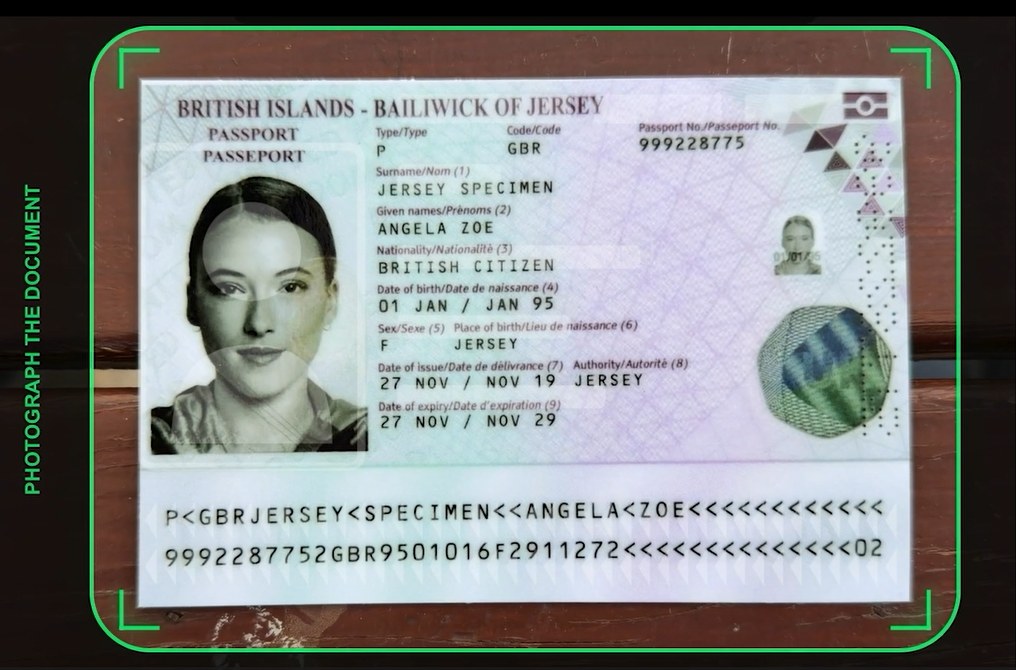
If something is wrong, the guest sees a short instruction on the screen. The frame also shows whether the document is ready. When the image passes the checks, it is captured automatically — the guest does not need to press a button at the right moment.
Why capture quality matters for recognition — see our article on document capture and OCR accuracy.
Three ways to collect a document
The guest receives a registration link and completes the process on their own phone, without help from hotel staff.
Staff can open the same camera flow on their device, so the guest can photograph the document directly at reception.
Staff can create a registration link for a specific guest and send it through a convenient channel.
All three options produce the same guest data and use the same recognition process.
If a guest does not respond
Staff can quickly contact a guest who has not completed registration and send them the registration link through WhatsApp, Viber, Zalo, or Telegram.
The messages are not sent automatically. Staff decide who to contact and when.
The dashboard also shows which guests are still waiting to complete registration, so staff do not have to search through the entire guest list.
You can also try the same recognition engine separately with the free passport data extractor.
Guest documents and data
Misfora works with identity documents based on international ICAO standards.
Two-line MRZ with 44 characters per line — the TD3 format used by passports.
Three-line MRZ with 30 characters per line — the TD1 format used by many national ID cards.
See the full list on the supported documents page. Additional document types, such as residence permits and other identity documents, can be added over time.
What Misfora extracts
The document photo is saved with the guest record. If some fields could not be recognized, staff can open the photo and fill in the missing data manually — or wait for the guest to send another photo, and Misfora will fill in the gaps automatically.
Data validation
Extracting text is only part of the process. The system also checks whether the data is consistent.
Document numbers and dates are checked using MRZ checksums. Names are handled separately because spelling can vary between documents, languages, and reservation systems.
Once information has been confirmed, it is not overwritten by another scan. A new document photo can fill in missing information, but it does not replace data that has already been confirmed.
Comparing the document with the reservation
The recognized document is compared with the guest's reservation. Any difference in the name or surname — from a small typo or a different transliteration to a completely different name — is sent for staff review instead of being silently accepted.
This helps catch common problems such as a typo in the reservation, the wrong document, or a document belonging to another guest on the same booking.
Reservation synchronization
Reservations come from your PMS or Google Sheet — staff do not need to enter them manually.
Misfora connects to Exely through its API. Reservation changes are synchronized automatically, with additional checks to keep the data up to date.
For properties without a PMS, reservations can be managed in a Google Sheet. Misfora reads the reservation data from the sheet and manages guest registration separately. See how Google Sheets works.
Additional PMS platforms can be connected through separate integration modules. The guest registration process does not need to change when another PMS is added.
Check-in from the guest table
Once the guest's document has been confirmed and the stay is paid, staff can click Check in directly in the guest table.
Misfora records the actual check-in time, which is also used for government registration where it applies. When a PMS is connected, the check-in can also be reflected there, so staff do not have to enter the same information twice.
Reservations with several rooms can be handled within the same workflow.
Guest table
A guest table that fits the way your team works.
The guest table can show the information staff need: name, document, dates, room, contact details, payment, registration status, and more. A small villa manager does not need the same columns as a busy hotel reception desk, so unnecessary columns can be hidden.
Each staff member can have their own table settings. Changing the columns for one employee does not change them for everyone else.
You can also use different columns for guests who are arriving soon and guests who are already staying. On a phone, the table can show fewer columns than on a desktop.
Government registration
Some countries require hotels to submit guest information to a government registration system. Misfora prepares and sends the required data where an integration is available.
In countries without a connected government integration, Misfora still collects and verifies guest documents and keeps structured guest records — deleted at checkout where storage isn't required, or kept according to the property's retention settings and applicable local requirements where a guest register is needed. Staff can also export guest data to a spreadsheet (CSV) at any time. Government integrations are added separately for countries with specific reporting requirements, while the main registration process stays the same.
Integration with Turkey's mandatory guest registration system. How KBS reporting works.
The integration structure is prepared; the exact Hospedajes/SES format is being checked against the official documentation.
Guest documents are collected, verified and stored with the guest record according to your property's retention settings — even when direct government submission is not available.
Before submission, staff can review the data that will be sent for each guest in the dashboard.
How the platform works
One guest record connects the document, the reservation, the PMS and — where required — government registration.
Whether a reservation comes from a PMS or a spreadsheet, Misfora converts it into the same internal structure:
This means the main registration process does not depend on where the reservation came from. PMS integrations, document recognition and government connections can work independently.
Reservations from PMS platforms or spreadsheets are converted into one format. Currently — Exely and Google Sheets.
A document photo is turned into structured data. Currently — passports and ID cards.
An optional module: guest data is converted into the format a country requires. Currently — Turkey (KBS).
Security
- Document images are stored separately from the reservation and guest database, in private storage. An image can only be opened through a short-lived link created on request — there are no permanent public links.
- Role-based access. Each staff member has their own login, and a hotel can only see its own data.
- Access log. Misfora records which staff member accessed guest data and when.
- Stored only as long as needed. Where storage isn't required, guest data is deleted at checkout. Where a guest register is needed, records are kept according to the property's retention settings and applicable local requirements, then deleted automatically.
- No model training. Document images and guest data are not used to train AI models.
More details in our privacy policy.
How to connect a PMS — see the Exely integration page. How the daily front desk workflow looks — see the guide.